Trak Stock
Trak every bar. Stock counts and stock management for event bars.
Count, order and balance stock across every bar, straight from the phone.
- Web portal, and the mobile app on iPhone and Android
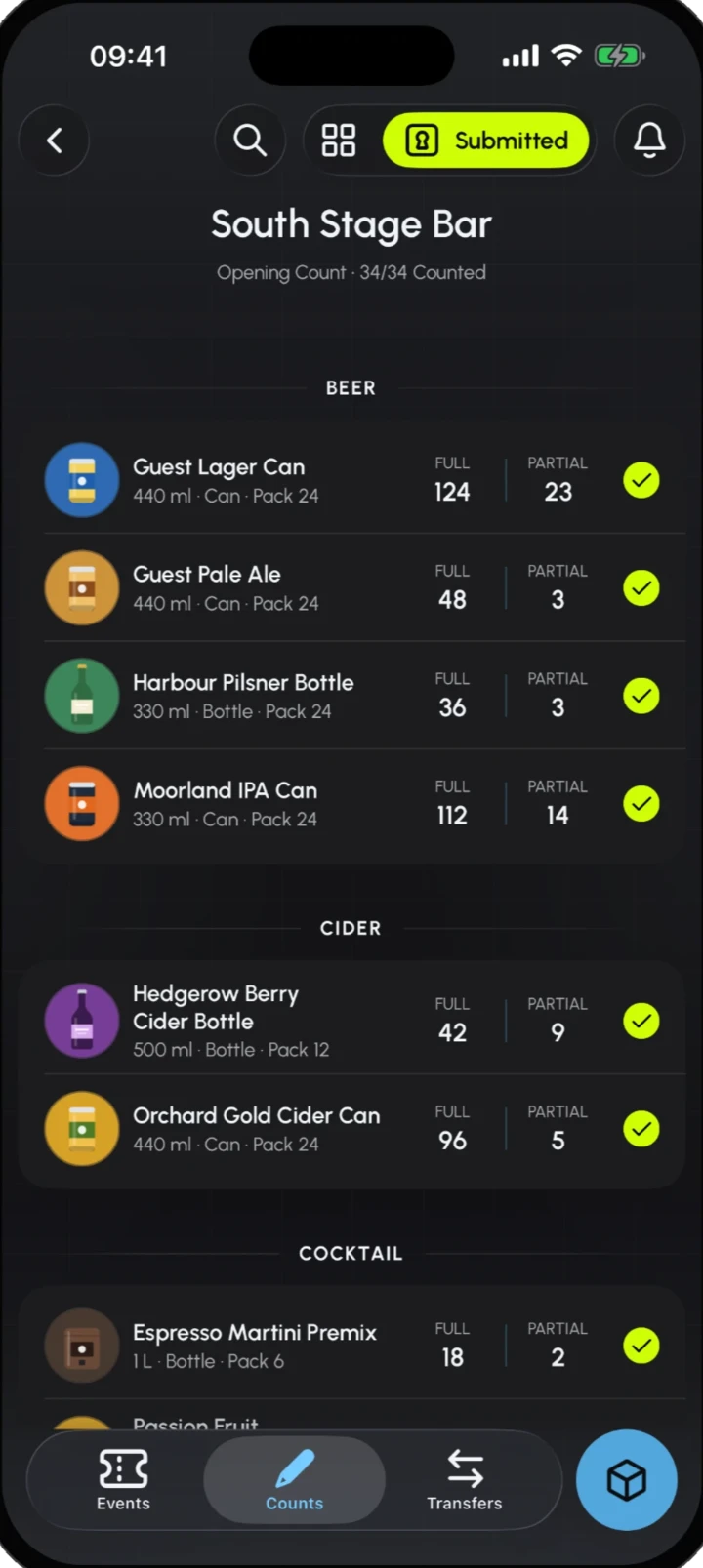
- Opening Count09:41South Stage Bar: 34 of 34 counted.
- Delivery received11:20Checked in against the order.
- Transfer received16:05Main Store to South Stage Bar.
- Closing Count23:30Submitted, ready to balance.
- Stock counts done on Trak
- 150+
Since April, at festivals, venues and event days across the UK.
Counts
Count every bar on the phone.
Each product is counted as full packs and loose units. Count together, with or without signal.
South Stage BarOpening Count · 5/5 counted
Submitted- Guest Lager Can440 ml · Can · Pack 24Full124Partial23
- Guest Pale Ale440 ml · Can · Pack 24Full48Partial3
- Harbour Pilsner Bottle330 ml · Bottle · Pack 24Full36Partial3
- Orchard Gold Cider Can440 ml · Can · Pack 24Full96Partial5
- Espresso Martini Premix1 L · Bottle · Pack 6Full18Partial2
- Opening
- Closing
- Post-show
- Ad hoc
- Recount
- Audit
- Blind counts
Balancing
Know what every bar used.
What was delivered, less what the count found. Bar by bar, then balanced against the tills.
Festival Lager Keg · 50 L · kegs
A missing count is never a zero.
Distribution
Move stock between bars.
Raise a transfer on the phone. It is marked moved when it leaves and received when it lands.
Transfer
Main StoreSouth Stage Bar
6 × Guest Lager Can
- Open
- Moved
- Received
Plan and order
From the menu to the lorry.
Build the event's menu from your library, turn it into supplier orders, and plan the pallets onto the lorry.
01 · Event Menu
4 products
- Guest Lager Can
- Guest Pale Ale
- Harbour Pilsner Bottle
- Orchard Gold Cider Can
02 · Order
Approved
- Guest Lager Can60packs
- Guest Pale Ale24packs
- Harbour Pilsner Bottle18packs
- Orchard Gold Cider Can48packs
03 · Load Plan
18 of 24 pallets
- 20ft artic
- 40ft artic
- Walk-in fridge
- Custom
Lite, Pro or Ultra
Start with the counts.
Lite is the counts, with the menu they need. Pro is the stock management suite. Ultra adds the map and the forecast.
All of Trak Stock, with the site map and the forecast.
Plan & Order
- Library
- Menu Builder
- Suppliers
- Orders
- Places
On Site
- Distribution
- Map
- Counts
Reconcile
- Balancing
- Accounts
- Forecast
Same universe
Works with.
Questions
Stock questions.
Yes. Stock Lite is the stock counting, with the library and the menu builder the counts need: build the menu on the web and count every bar from the phone. Pro adds the rest of the stock management suite, from the order to balancing the bars, and Ultra adds the site map and the forecast.
Each bar's count lists the products to count, grouped by category. Each one is counted as full packs and loose units, on the phone, and more than one person can count the same bar at once.
Yes. Once a count is on the phone it can be finished with no signal, and it syncs when the signal comes back.
Stock comes at three levels, each for a number of people on the app and admins on the web portal. Lite is £5 a month for 5 app users, 1 web portal admin. Pro is £30 a month for 20 app users, 3 web portal admins. Ultra, for 30 app users, 10 web portal admins, is priced with you. Plans are monthly, with no contract: cancel any time.
Trak your events.
Your next event, run on Trak. See the web portal and the event app in a live demo.